 Login
Join
Logout
Login
Join
Logout
Today Sudoku
Classic Sudoku
Samurai Sudoku
Archives
Sudokus with no one can solve
X Sums Sudoku
Classic Sudoku
Little killer sudoku
Extra Regions Sudoku
Makodoku
Sum Frame Sudoku
Group Sum Sudoku
Greater Than Sudoku
Multi Diagonal Sudoku
Clone Sudoku
Skyscrapers Sudoku
Hybrid Sudoku ( X Sums + Consecutive )
Quadruple sudoku
Hybrid Sudoku ( X Sums + Consecutive )
Kropki Sudoku
Hybrid Sudoku ( Consecutive Pairs + Sum Frame )
Greater Than Kropki Sudoku
Consecutive Sudoku
XV Sudoku
Consecutive Sudoku
Exclude Sudoku
Thermo Sudoku
MiniMax Sudoku
XV Sudoku
Count different Sudoku
Hybrid Sudoku ( X Sums + Greater Than )
Color Sudoku
Products Sudoku
Hybrid Sudoku ( Greater Than + Sum Frame )
Maximin Sudoku
You can now create a Today Sudoku account! Save partially completed questions, switch between devices, track your progress through archives, and record your puzzles solving time.
Join
Join
This site ensures that all the sudoku puzzles provided have a unique solution. If you find a problem with multiple solutions, please pay attention to the additional rules of the puzzle.

Welcome to Sudoku Today!
Welcome to Sudoku.today! Enjoy daily Sudoku puzzles including classic Sudoku and over 50 unique variants. Challenge your mind every day with new puzzles!
Today's Sudoku
20 December 2025
Give me Five Sudoku
- Place a digit from 1 to 9 into each of the empty squares so that each digit appears exactly once in each of the rows, columns and the nine outlined 3x3 regions.
- Sum and difference of two orthogonally adjacent numbers must not be 5.

Give me Five Sudoku
- Place a digit from 1 to 9 into each of the empty squares so that each digit appears exactly once in each of the rows, columns and the nine outlined 3x3 regions.
- Sum and difference of two orthogonally adjacent numbers must not be 5.
No Touch Sudoku
- Place a digit from 1 to 9 into each of the empty squares so that each digit appears exactly once in each of the rows, columns and the nine outlined 3x3 regions.
- Identical digits do not touch each other diagonally.

No Touch Sudoku
- Place a digit from 1 to 9 into each of the empty squares so that each digit appears exactly once in each of the rows, columns and the nine outlined 3x3 regions.
- Identical digits do not touch each other diagonally.
Consecutive Sudoku
- Place a digit from 1 to 9 into each of the empty squares so that each digit appears exactly once in each of the rows, columns and the nine outlined 3x3 regions.
- There are some dots between cells. The numbers on each side of a dot must always be consecutive. Not all possible dots are marked.

Consecutive Sudoku
- Place a digit from 1 to 9 into each of the empty squares so that each digit appears exactly once in each of the rows, columns and the nine outlined 3x3 regions.
- There are some dots between cells. The numbers on each side of a dot must always be consecutive. Not all possible dots are marked.
Ten Box Sudoku
- The diagram is a toroid; some of the 3×3 regions don't end at the right (lower) edge of the diagram but continue at the left (upper) edge of the diagram.

Ten Box Sudoku
- The diagram is a toroid; some of the 3×3 regions don't end at the right (lower) edge of the diagram but continue at the left (upper) edge of the diagram.
Kropki Sudoku
- Place a digit from 1 to 9 into each of the empty squares so that each digit appears exactly once in each of the rows, columns and the nine outlined 3x3 regions.
- If absolute difference between two digits in neighbouring cells equals 1, then they are separated by a white dot. If the digit is a half of digit in the neighbouring cell, then they are separated by black dot. The dot between 1 and 2 can be either white or black.

Kropki Sudoku
- Place a digit from 1 to 9 into each of the empty squares so that each digit appears exactly once in each of the rows, columns and the nine outlined 3x3 regions.
- If absolute difference between two digits in neighbouring cells equals 1, then they are separated by a white dot. If the digit is a half of digit in the neighbouring cell, then they are separated by black dot. The dot between 1 and 2 can be either white or black.
Hybrid Sudoku ( X Sums + Greater Than )
- Place a digit from 1 to 9 into each of the empty squares so that each digit appears exactly once in each of the rows, columns and the nine outlined 3x3 regions.
- Each number outside the grid is the sum of the first X numbers placed in the corresponding direction, where X is equal to the first number placed in that direction.
- Digits have to be place in accordance with the “greater than” signs.

Hybrid Sudoku ( X Sums + Greater Than )
- Place a digit from 1 to 9 into each of the empty squares so that each digit appears exactly once in each of the rows, columns and the nine outlined 3x3 regions.
- Each number outside the grid is the sum of the first X numbers placed in the corresponding direction, where X is equal to the first number placed in that direction.
- Digits have to be place in accordance with the “greater than” signs.
Extra Regions Sudoku
- Place a digit from 1 to 9 into each of the empty squares so that each digit appears exactly once in each of the rows, columns and the nine outlined 3x3 regions.
- The connected shaded cells contain each digit from 1 to 9.

Extra Regions Sudoku
- Place a digit from 1 to 9 into each of the empty squares so that each digit appears exactly once in each of the rows, columns and the nine outlined 3x3 regions.
- The connected shaded cells contain each digit from 1 to 9.
Neighbourship Sudoku
- Place a digit from 1 to 9 into each of the empty squares so that each digit appears exactly once in each of the rows, columns and the nine outlined 3x3 regions.
- A number in a squared cell indicates how many different numbers the four diagonally adjacent cells contain. A number in a circled cell indicates how many different numbers the eight orthogonally and diagonally adjacent cells contain.

Neighbourship Sudoku
- Place a digit from 1 to 9 into each of the empty squares so that each digit appears exactly once in each of the rows, columns and the nine outlined 3x3 regions.
- A number in a squared cell indicates how many different numbers the four diagonally adjacent cells contain. A number in a circled cell indicates how many different numbers the eight orthogonally and diagonally adjacent cells contain.
Greater Than Kropki Sudoku
- Place a digit from 1 to 9 into each of the empty squares so that each digit appears exactly once in each of the rows, columns and the nine outlined 3x3 regions.
- In all cases where two digits have a consecutive value or one digit is two times as big as the other digit (or both), a greater than sign is placed. Digits have to be placed in accordance with the sign.

Greater Than Kropki Sudoku
- Place a digit from 1 to 9 into each of the empty squares so that each digit appears exactly once in each of the rows, columns and the nine outlined 3x3 regions.
- In all cases where two digits have a consecutive value or one digit is two times as big as the other digit (or both), a greater than sign is placed. Digits have to be placed in accordance with the sign.
Differences Sudoku
- Place a digit from 1 to 9 into each of the empty squares so that each digit appears exactly once in each of the rows, columns and the nine outlined 3x3 regions.
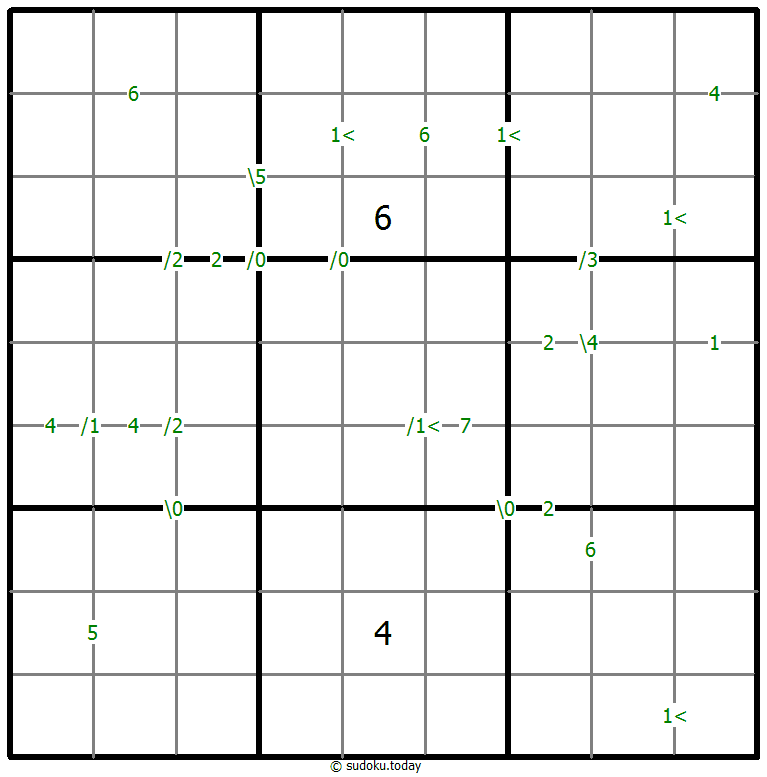
- A number between two cells indicates the difference of the numbers in these cells. A number between four cells indicates the difference between two diagonally adjacent cells, either top left + right bottom (\) or top right + bottom left (/). If one of the characters < or > is specified the apex of the angle points to the smaller of these numbers.
Differences Sudoku
- Place a digit from 1 to 9 into each of the empty squares so that each digit appears exactly once in each of the rows, columns and the nine outlined 3x3 regions.
- A number between two cells indicates the difference of the numbers in these cells. A number between four cells indicates the difference between two diagonally adjacent cells, either top left + right bottom (\) or top right + bottom left (/). If one of the characters < or > is specified the apex of the angle points to the smaller of these numbers.
Thermo Sudoku
- Place a digit from 1 to 9 into each of the empty squares so that each digit appears exactly once in each of the rows, columns and the nine outlined 3x3 regions.
- Some thermometer shapes are placed in the grid. Digits are strictly increasing from the round bulb of the thermometer to each flat end.

Thermo Sudoku
- Place a digit from 1 to 9 into each of the empty squares so that each digit appears exactly once in each of the rows, columns and the nine outlined 3x3 regions.
- Some thermometer shapes are placed in the grid. Digits are strictly increasing from the round bulb of the thermometer to each flat end.
Quadruple sudoku
- Place a digit from 1 to 9 into each of the empty squares so that each digit appears exactly once in each of the rows, columns and the nine outlined 3x3 regions.
- Each set of four digits in the intersection of two lines indicates the digits that have to be placed in the four adjacent cells.

Quadruple sudoku
- Place a digit from 1 to 9 into each of the empty squares so that each digit appears exactly once in each of the rows, columns and the nine outlined 3x3 regions.
- Each set of four digits in the intersection of two lines indicates the digits that have to be placed in the four adjacent cells.
Neighbourship Sudoku
- Place a digit from 1 to 9 into each of the empty squares so that each digit appears exactly once in each of the rows, columns and the nine outlined 3x3 regions.
- A number in a squared cell indicates how many different numbers the four diagonally adjacent cells contain. A number in a circled cell indicates how many different numbers the eight orthogonally and diagonally adjacent cells contain.

Neighbourship Sudoku
- Place a digit from 1 to 9 into each of the empty squares so that each digit appears exactly once in each of the rows, columns and the nine outlined 3x3 regions.
- A number in a squared cell indicates how many different numbers the four diagonally adjacent cells contain. A number in a circled cell indicates how many different numbers the eight orthogonally and diagonally adjacent cells contain.
Extra Regions Sudoku
- Place a digit from 1 to 9 into each of the empty squares so that each digit appears exactly once in each of the rows, columns and the nine outlined 3x3 regions.
- The connected shaded cells contain each digit from 1 to 9.

Extra Regions Sudoku
- Place a digit from 1 to 9 into each of the empty squares so that each digit appears exactly once in each of the rows, columns and the nine outlined 3x3 regions.
- The connected shaded cells contain each digit from 1 to 9.
Non XV sudoku
- Place a digit from 1 to 9 into each of the empty squares so that each digit appears exactly once in each of the rows, columns and the nine outlined 3x3 regions.
- The digits in two orthogonally adjacent cells cannot have a sum of either 5 or 10.

Non XV sudoku
- Place a digit from 1 to 9 into each of the empty squares so that each digit appears exactly once in each of the rows, columns and the nine outlined 3x3 regions.
- The digits in two orthogonally adjacent cells cannot have a sum of either 5 or 10.
Clone Sudoku
- Place a digit from 1 to 9 into each of the empty squares so that each digit appears exactly once in each of the rows, columns and the nine outlined 3x3 regions.
- Grey cells in the grid represent many cloned areas. Digits in these areas on corresponding positions must be identical. Cloned areas are only moved, without rotation or reflection.

Clone Sudoku
- Place a digit from 1 to 9 into each of the empty squares so that each digit appears exactly once in each of the rows, columns and the nine outlined 3x3 regions.
- Grey cells in the grid represent many cloned areas. Digits in these areas on corresponding positions must be identical. Cloned areas are only moved, without rotation or reflection.
Parity Lines Sudoku
- Place a digit from 1 to 9 into each of the empty squares so that each digit appears exactly once in each of the rows, columns and the nine outlined 3x3 regions.
- Digits along each marked line are either all odd or all even.

Parity Lines Sudoku
- Place a digit from 1 to 9 into each of the empty squares so that each digit appears exactly once in each of the rows, columns and the nine outlined 3x3 regions.
- Digits along each marked line are either all odd or all even.
Makodoku
- Place a digit from 1 to 9 into each of the empty squares so that each digit appears exactly once in each of the rows, columns and the nine outlined 3x3 regions.
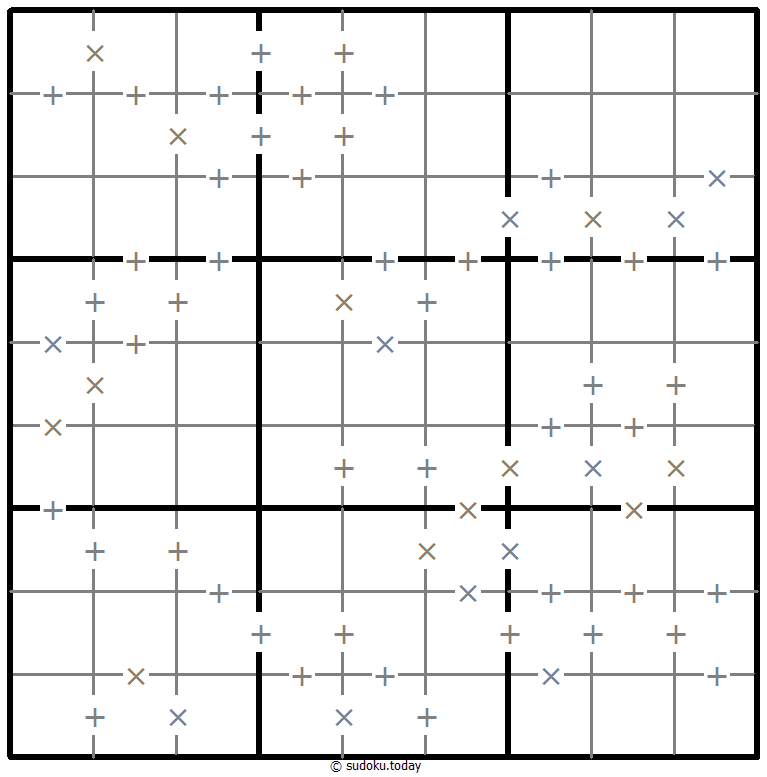
- A cross between two cells indicates that the product of the numbers in these cells is less than 10. A plus between two cells indicates that the sum of the numbers in these cells is less than 10. If the sum and product are less than 10, then there is a cross between these cells. If there is no sign between two cells, then both sum and product are at least 10.
Makodoku
- Place a digit from 1 to 9 into each of the empty squares so that each digit appears exactly once in each of the rows, columns and the nine outlined 3x3 regions.
- A cross between two cells indicates that the product of the numbers in these cells is less than 10. A plus between two cells indicates that the sum of the numbers in these cells is less than 10. If the sum and product are less than 10, then there is a cross between these cells. If there is no sign between two cells, then both sum and product are at least 10.
Search 9 Sudoku
- Place a digit from 1 to 9 into each of the empty squares so that each digit appears exactly once in each of the rows, columns and the nine outlined 3x3 regions.
- The number in a cell with an arrow indicates the distance to the cell with the number 9 in the direction the arrow points to.

Search 9 Sudoku
- Place a digit from 1 to 9 into each of the empty squares so that each digit appears exactly once in each of the rows, columns and the nine outlined 3x3 regions.
- The number in a cell with an arrow indicates the distance to the cell with the number 9 in the direction the arrow points to.
Kropki Sudoku
- Place a digit from 1 to 9 into each of the empty squares so that each digit appears exactly once in each of the rows, columns and the nine outlined 3x3 regions.
- If absolute difference between two digits in neighbouring cells equals 1, then they are separated by a white dot. If the digit is a half of digit in the neighbouring cell, then they are separated by black dot. The dot between 1 and 2 can be either white or black.

Kropki Sudoku
- Place a digit from 1 to 9 into each of the empty squares so that each digit appears exactly once in each of the rows, columns and the nine outlined 3x3 regions.
- If absolute difference between two digits in neighbouring cells equals 1, then they are separated by a white dot. If the digit is a half of digit in the neighbouring cell, then they are separated by black dot. The dot between 1 and 2 can be either white or black.
English | 中文(简体) | 中文(繁體) | 日本語 | 한국어 | Français | Deutsch | Español | Português | Русский | Italiano | Nederlands | Türkçe | हिन्दी | ไทย | Tiếng Việt | Bahasa Indonesia | Polski | Українська |
数独 | Cool Sudoku | 数独 | Sudoku Puzzle | 賢くなるパズル
© sudoku.today All rights reserved 2019-2025